
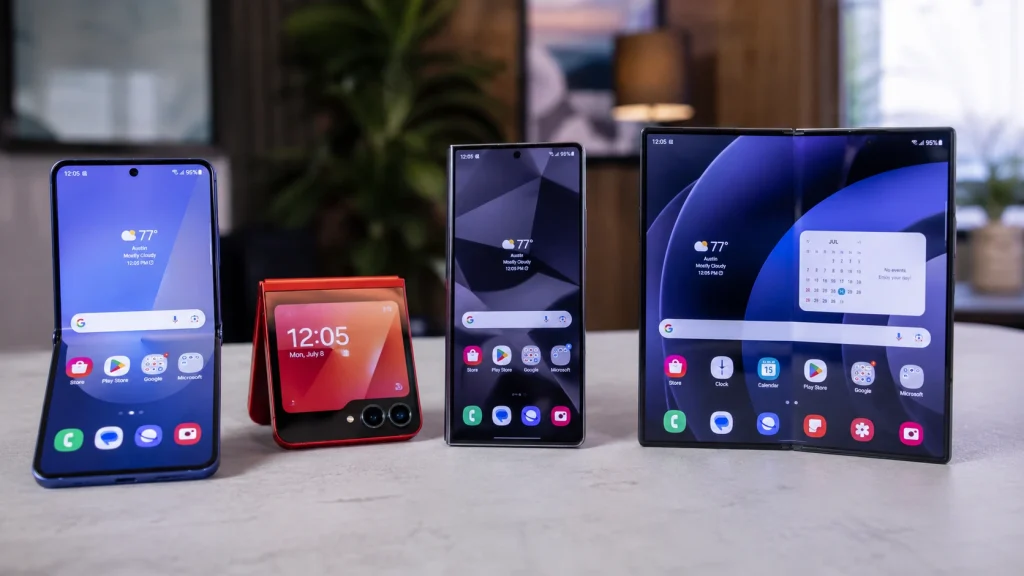
The foldable smartphone market has officially evolved from an experimental novelty into a mature, high-performance ecosystem. A few years ago, buying a foldable phone meant accepting compromises: noticeable display creases, thicker profiles, fragile hinges, and sub-par battery life. Today, devices like the Samsung Galaxy Z Fold 8 have rewritten those rules.
However, if you are reading this, chances are you aren’t a first-time buyer. You likely already have a foldable device in your pocket—whether that is a Galaxy Z Fold 4, a Z Fold 5, a Z Fold 6, or a compact clamshell like the Z Flip series.
That brings up a massive $1,800 question: If you already own a foldable, is the Galaxy Z Fold 8 a big enough leap forward to justify upgrading? Or should you hold onto your current device for another year?
In this comprehensive upgrade guide, we break down the real-world value, generational performance jumps, trade-in economics, and productivity upgrades of the Galaxy Z Fold 8 to help you make the smartest financial and technical decision.
1. What’s Truly New in the Galaxy Z Fold 8? (Beyond the Hype)
Before analyzing whether you should ditch your current phone, let’s look at the actual structural and hardware engineering upgrades introduced in the Galaxy Z Fold 8.
Next-Generation Armor Hinge & Near-Invisible Crease
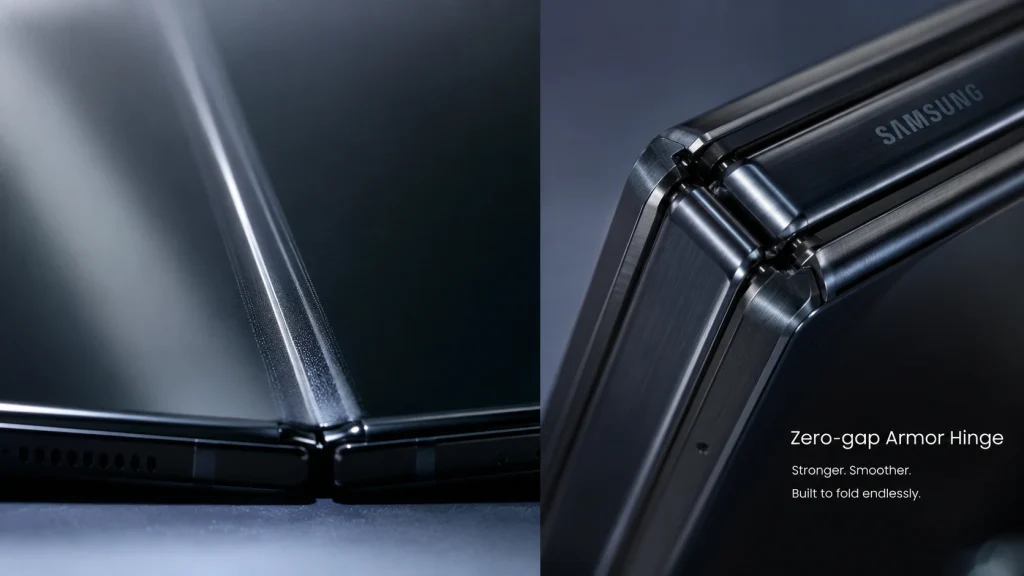
The biggest visual and tactile complaint from long-time foldable users has always been the center display crease and hinge bulk. Samsung’s updated Zero-Gap Flex Hinge on the Z Fold 8 significantly reduces the crease depth using advanced inner plate mechanics. When browsing dark-mode websites or watching videos, the reflection disruption across the fold line is practically eliminated compared to the prominent dip on the Fold 4 or Fold 5.
Thinner, Lighter, and More Ergonomic
Carrying an older Z Fold felt like carrying two standard smartphones stacked together. The Z Fold 8 shaves off crucial millimeters in thickness and drops the weight down significantly, making single-handed texting on the cover screen feel like a traditional flagship rather than a heavy brick.
Display Anti-Reflective Coating & Peak Outdoor Brightness
Power users working outdoors will immediately notice the upgraded anti-reflective display coating on the inner screen. Combined with higher peak nits of brightness, outdoor visibility under direct sunlight is no longer hindered by glossy panel glare.
2. Upgrading From Older Generations: Is It Time?
The decision to upgrade depends heavily on which specific generation of foldable device you currently carry. Let’s break down the jump from each previous model.
- Massive jump in battery & performance
- New wide outer display experience
- Full Galaxy AI hardware engine
- Incremental jump in overall speed
- Refined hinge & lighter body
- Upgrade only if trade-in credit is high
- Major bump in workstation productivity
- S-Pen & multi-window support
- Superior telephoto camera system
A. Upgrading from Galaxy Z Fold 3 or Z Fold 4: The “Must Upgrade” Zone
If you are still holding onto a Galaxy Z Fold 3 or Z Fold 4, your device is likely showing signs of aging battery health, mechanical wear on the inner screen protector, and thermal throttling under heavy workloads.
- Performance & Thermal Management: Jumping from the Snapdragon 8 Gen 1 (Fold 4) to the latest Snapdragon silicon provides massive GPU gains and dramatically improved thermal efficiency. The Z Fold 8 features an expanded Vapor Chamber cooling system, preventing the phone from heating up during multitasking or intensive gaming sessions.
- Battery Endurance: The combination of a more power-efficient chipset and smarter LTPO display refresh rates gives the Z Fold 8 up to 2 to 3 hours of extra screen-on time compared to a worn-out Fold 4 battery.
- Camera Optimization: Enhanced computational photography engines and updated ISP processing mean low-light night shots and zoomed portrait images are noticeably sharper.
Verdict for Z Fold 3/4 Owners: UPGRADE IMMEDIATELY. The cumulative jumps in hinge durability, battery life, outer screen usability, and overall ergonomics make this a massive day-to-day upgrade.
B. Upgrading from Galaxy Z Fold 5 or Z Fold 6: The “Conditional” Zone
For owners of the Z Fold 5 or Z Fold 6, the decision becomes much more nuanced.
- Z Fold 5 Users: The main reason to jump to the Z Fold 8 is the form factor overhaul. The wider cover screen of the newer generation completely changes how comfortably you can type quick messages without opening the device. Furthermore, advanced Galaxy AI processing runs significantly faster natively on the newer NPU hardware.
- Z Fold 6 Users: The raw performance bump from last year’s model to the Fold 8 is incremental. Unless you are experiencing physical wear, taking advantage of an aggressive carrier trade-in promo, or desperately need the refined hinge and lighter build, holding for another year is completely reasonable.
Verdict for Z Fold 5/6 Owners: HOLD OR TRADE-IN BASED ON DEALS. Upgrade only if carrier or manufacturer trade-in values make out-of-pocket costs negligible.
C. Upgrading from a Galaxy Z Flip Series: The “Power Shift”
Switching from a compact clamshell (like the Z Flip 5 or Z Flip 6) to a horizontal book-style foldable is not just an incremental step—it is an entirely different user experience.
- From Pocket Style to Mobile Workstation: While the Z Flip series excels at pocketability and quick cover screen interactions, it lacks screen real estate for serious document editing, side-by-side app usage, and stylus support.
- Battery & Camera Gains: Due to its larger physical footprint, the Z Fold 8 packs higher battery capacity and superior telephoto zoom lenses compared to the compact dual-camera setup on the Z Flip series.
Verdict for Z Flip Owners: UPGRADE IF YOUR WORKFLOW REQUIRES REAL ESTATE. If you find yourself constantly wishing for a tablet experience on the go, making the jump to the Fold 8 will redefine your productivity.
3. Business & Productivity: Is the Z Fold 8 Worth the Premium Price?
The high price tag of the Galaxy Z Fold 8 positions it as an enterprise-tier device. For business executives, remote workers, content creators, and financial traders, the device functions less like a phone and more like a pocketable laptop replacement.
Galaxy Z Fold 8 Productivity Trifecta
3-App Multitasking
Run Zoom, Slack, & Docs simultaneously without lag using active split-screen windows.
S-Pen Integration
Precision photo editing, digital document signing, and instant note taking on the main display.
Galaxy AI Suite
Real-time call translation, audio transcription, and instant document summarization.
Multi-Window Multitasking & Wireless DeX
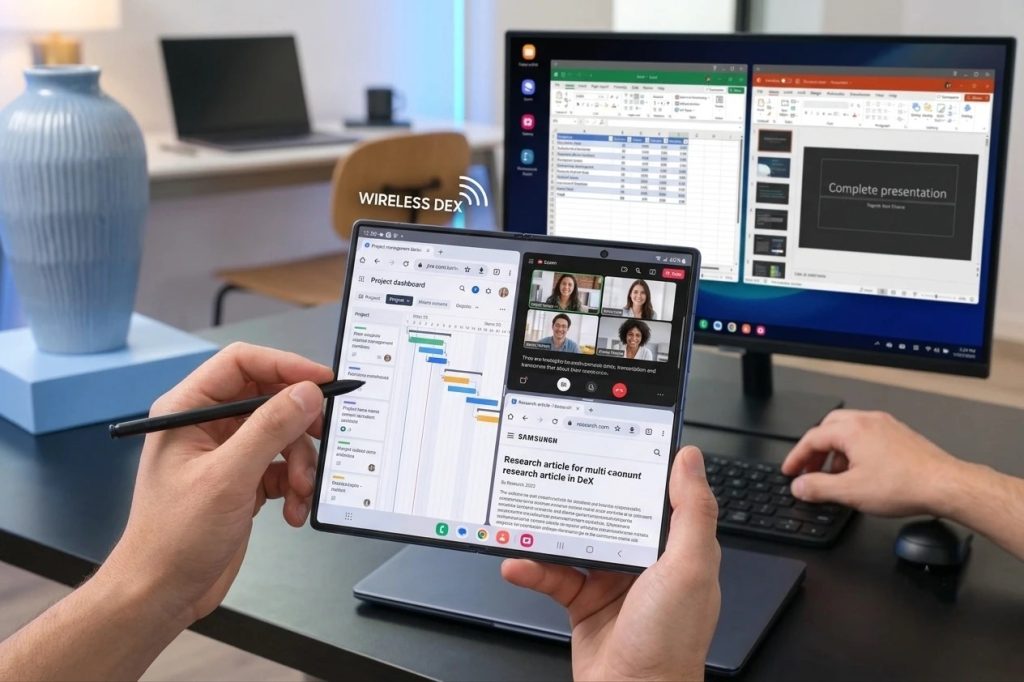
The 7.6-inch main inner screen allows you to run three active apps simultaneously in split-screen mode, along with floating pop-up windows. You can effortlessly conduct a video call on top, take notes on the left, and cross-reference a PDF or spreadsheet on the right.
Furthermore, Samsung DeX enables you to connect the Z Fold 8 wirelessly to a smart monitor or TV, transforming the phone into a full desktop interface powered by a desktop browser, mouse, and keyboard support.
Advanced Galaxy AI Features for Work
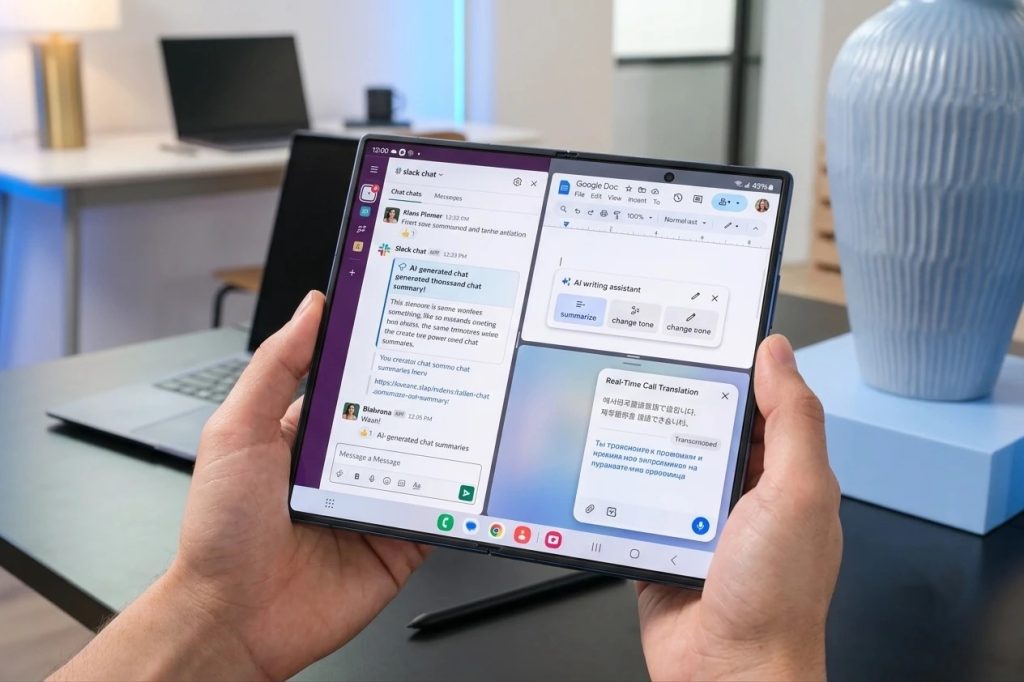
Modern mobile productivity relies heavily on AI workflows, and the hardware inside the Z Fold 8 is engineered for on-device processing:
- Real-Time Call & Audio Translation: Instant two-way translation during international conference calls or in-person business meetings.
- Note Assist & Document Summarization: Auto-format hand-written S-Pen notes, generate quick bullet points from long research papers, and translate PDF files natively inside Samsung Notes.
- Generative Image & Editing Tools: Quickly clean up background elements, expand canvases, or draft creative assets directly on the display.
4. Financial Breakdown: Trade-In Values, Carrier Deals, & Resale Value
Because foldable devices carry higher initial price tags, smart consumers rarely pay full retail price ($1,799+ MSRP). The upgrade math becomes significantly more attractive when factoring in trade-in incentives and total cost of ownership (TCO).
Evaluating Samsung & Carrier Trade-In Promotions
During launch windows and promotional periods, major telecom carriers and Samsung directly offer high-tier trade-in values for existing foldable hardware.
(Note: Trade-in promos vary by market, carrier, and device condition.)
Resale Value Depreciation Trends
Foldables tend to experience steeper initial depreciation curves than standard slab phones due to rapid generational improvements in hinge mechanics and screens.
If you hold onto an older Fold for more than 3 to 4 years, its trade-in residual value drops drastically. Upgrading every 2 to 3 years allows you to capture the peak trade-in credit bracket, effectively lowering your annualized cost of ownership.
5. When You Should SKIP the Galaxy Z Fold 8
An honest buying guide must also highlight when not to spend your hard-earned money. You should hold off on buying the Z Fold 8 if:
- You Expect Ultra-Thinner Slab Dimensions: While the Z Fold 8 is significantly thinner than older iterations, folded book-style devices will inherently remain slightly thicker than conventional flagship phones.
- Camera Specs are Your #1 Priority: If photography is your primary reason for owning a smartphone, standard slab flagships (like the Galaxy S Ultra series) still house physically larger periscope zoom sensors and higher megapixel counts due to space constraints inside thin foldable halves.
- You Prefer One-Handed Small Phones Exclusively: If you rarely unfold your phone and prefer light, compact devices for simple daily tasks, sticking with a Z Flip or standard flagship makes much more practical sense.
6. Final Verdict: Should You Upgrade Today?
The Samsung Galaxy Z Fold 8 is no longer just a luxury tech toy for early adopters—it is a refined, durable, and hyper-efficient productivity engine.
Summary Matrix: Should You Upgrade?
Massive real-world jump in display, hinge, & battery
If moving to desktop productivity & large screen
Upgrade only if trade-in deals or carrier promos are high
Hold your phone; wait for the next major redesign
If you are upgrading from an older generation like the Z Fold 3 or Z Fold 4, the leaps in outer display usability, hinge durability, creaseless viewing, battery life, and overall thermal efficiency make the Z Fold 8 feel like a completely different class of device.
Take advantage of current trade-in promotions and carrier financing deals to lock in the lowest out-of-pocket cost, and step into the most refined foldable experience on the market today.
Frequently Asked Questions
Is it worth upgrading to the Galaxy Z Fold 8 from the Z Fold 5 or Z Fold 6?
If you own a Z Fold 5 or Fold 6, the decision comes down to trade-in value and ergonomics. The Z Fold 8 brings a noticeably wider, more comfortable outer cover screen, a much thinner body, and a near-invisible crease. However, in terms of raw daily speed, your current device is still highly capable. We recommend upgrading only if you can get a high trade-in credit ($800+) from Samsung or your carrier.
How much does it cost to upgrade to the Galaxy Z Fold 8 with trade-in?
Depending on your current device’s condition and active promotions, trading in a recent foldable (like the Fold 5, Fold 6, or Flip 6) can reduce the $1,799 MSRP by $500 to $1,000. During official launch windows or carrier upgrades, out-of-pocket costs typically range between $799 and $1,199.
Is the screen crease on the Galaxy Z Fold 8 completely gone?
While physics dictates that a folding screen must bend, the Z Fold 8 utilizes an upgraded Zero-Gap Flex Hinge and refined inner display layers that make the crease virtually invisible during daily multimedia consumption and direct viewing. Compared to the prominent dip on the Z Fold 3 or Fold 4, the difference is night and day.
Should I switch from a Galaxy Z Flip to a Galaxy Z Fold 8?
You should switch if you need a mobile workstation for work and productivity. The Z Flip is ideal for portability and pocketability, but the Z Fold 8 offers true multi-app multitasking, S-Pen support, a desktop-like browser experience, superior telephoto zoom cameras, and significantly longer battery life.
How many years of OS software updates will the Galaxy Z Fold 8 receive?
Samsung provides 7 years of Android OS upgrades and security patches for its flagship devices. This long-term support ensures high resale and trade-in value even if you decide to keep the device for several years.
Does the Galaxy Z Fold 8 come with a built-in S-Pen slot?
No, the Z Fold 8 maintains an ultra-slim chassis design, meaning the S-Pen is supported on the inner display but is not housed inside the phone itself. You can easily carry the S-Pen using official Samsung slim case accessories.

Dal Bahadur is a passionate tech enthusiast, hardware reviewer, and the founder of Phadera Tech. With years of experience in mobile technology and digital troubleshooting, he specializes in deep-dive smartphone reviews, gadget guides, and practical tech tips. His goal is to help readers make informed decisions before buying their next gadget.