
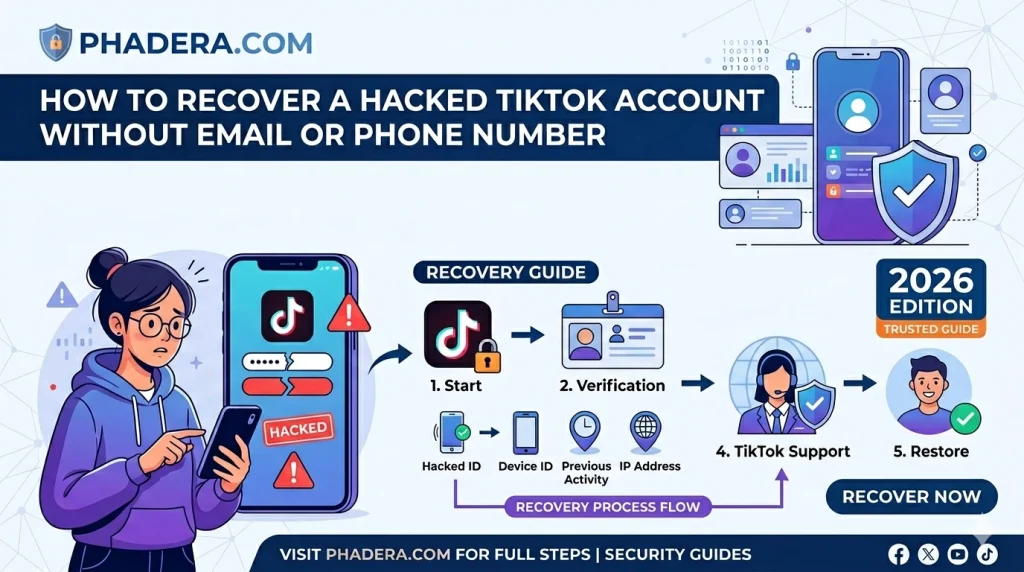
If you are panicking because your profile was compromised and the attacker instantly changed your login credentials, learning how to recover a hacked TikTok account without email or phone number is your top priority.
Discovering that a malicious actor bypassed your 2FA security to initiate a complete TikTok account hijack can be devastating, especially when standard recovery options fail. When a hacker locks you out by swapping your security settings, you cannot rely on automated password resets.
To fix this, you must bypass the standard login page and submit a direct ownership appeal. This Phadera Tech guide will walk you through using trusted device IDs and official support forms to reverse a TikTok session hijacking and reclaim your creator profile within 24 to 48 hours.
In the fast-paced world of short-form video, your TikTok account is more than just a collection of clips—it represents your digital identity, your community, and perhaps even your livelihood. Discovering that your account has been compromised can be an incredibly stressful experience.
When a hacker gains access, every minute matters. They might change your username, delete your hard-earned videos, or send spam messages to your followers.
This comprehensive guide provides an immediate, actionable roadmap to reclaim your compromised account, update your security protocols, and protect your digital presence from future vulnerabilities.
Related Guide: How to Recover a Hacked Facebook Account When Email and Phone Are Changed
Copy this TikTok Recovery Appeal Template
If you have lost access to both your registered email and phone number, submitting a direct appeal to TikTok Support is your final option. Use the mobile-friendly custom tool below to quickly copy our pre-formatted recovery template. Simply hit the “Copy Template” button, update the placeholder details (like your original device, creation date, and username) with your accurate account history, and paste it directly into TikTok’s official feedback form to regain access within 24–48 hours.
Subject: Urgent: My TikTok Account Has Been Hacked and Credentials Changed

Hi TikTok Support Team,

My TikTok account (@YOUR_USERNAME) has been hacked. The hacker has successfully changed both my registered email address and phone number, so I cannot use the standard recovery options.

I am writing this from my original device that I always used to access the account. To prove my ownership, here are the original registration details:

1. Original Username: @YOUR_USERNAME
2. Account Creation Date (Approx): [Month, Year]
3. Registered Device Model: [e.g., iPhone 13 / Samsung S23]
4. Location of Account Creation: [City, Country]
5. Linked Social Accounts (if any): [e.g., Instagram @username]

Please help me link this account back to my new secure email: [[email protected]]. I can provide identity verification or original video drafts if required.

Thank you,
[Your Name]
How Hackers Bypass TikTok 2FA: The Anatomy of an Account Hijack
Many creators believe that enabling Two-Factor Authentication (2FA) makes their TikTok accounts completely unhackable. They assume that as long as they don’t share their SMS verification codes or password, their audience and hard work are safe.
Unfortunately, this is a dangerous misconception.
In the modern threat landscape, hackers have evolved past trying to guess your credentials. Today, sophisticated account takeovers bypass the login page and multi-factor authentication entirely.
If you are a content creator or social media manager, understanding the technical mechanics of a modern TikTok hijack is the first line of defense in protecting your digital footprint.
The Death of the Password: How Bypassing 2FA Works
When you log into TikTok on your mobile app or desktop browser, TikTok’s servers verify your credentials once. After authentication, the server drops a small piece of data into your device called a Session Cookie or Auth Token.
This token acts like a temporary digital passport. It tells TikTok, “This device is already verified, do not prompt them for a password or 2FA code again.”
Modern hijackers do not want your password. They want that digital passport. If a hacker manages to steal your active session token, they can drop it into an anti-detect browser on their own computer. TikTok’s servers see a perfectly valid active token and grant immediate, unrestricted access—completely skipping the 2FA checkpoint.
The 3 Most Common Attack Paths
The 5-Minute Takeover Timeline
Once a hacker establishes access using a hijacked token or proxy, a race against the clock begins. The anatomy of a final takeover happens systematically in under 5 minutes:
- Reconnaissance: Automated scripts instantly read your account metrics, checking your follower count, monetization settings, and linked Creator Marketplace metrics.
- Revoking Active Devices: The hijacker immediately navigates to security settings and terminates all other active logged-in sessions—instantly kicking you out of your own app.
- Credential Swapping: The hacker swaps your registered email address and phone number to a disposable or secure alternative.
- Disabling Legacy Logs: Because they possess full session ownership, they register a completely fresh 2FA setup tied to their own physical device or Authenticator App, locking you out permanently.
⚠️ The Ultimate Creator Rule: Two-Factor Authentication is a lock, not a wall. Never open sponsorship contracts or attachments on the same machine where you manage your social accounts unless you have verified the sender’s domain identity completely. Turn off SMS-based 2FA and transition to a dedicated Authenticator App to prevent network intercept vectors.
If you want to dive deeper into the technical details, understand the “social media camera secret,” and learn how Android users can improve their video quality, check out this detailed guide:
👉 Read the full article here: Why TikTok Effects Look Better on iPhone Than Android
Phase 1: Instant Emergency Triage
Before initiating advanced support recovery methods, attempt immediate self-recovery to lock out the intruder before they can update your core security settings.
Method 1: The Account-Level Password Reset (Within 5 Minutes of Breach)
If the intruder has not yet modified your linked recovery information, you can intercept their access by forcing a global password reset. This action invalidates all current active session tokens across all devices.
[Login Screen] ──> [Forgot Password?] ──> [Select Email/Phone] ──> [Enter OTP] ──> [Force Global Logout]
- Open the TikTok application on your mobile device. If you are logged in but notice suspicious behavior, go to your Profile, tap the Menu (three lines) in the top-right corner, select Settings and Privacy, scroll down, and tap Log Out.
- On the main Login screen, select Use phone / email / username.
- Tap the Forgot password? link located directly below the input fields.
- Select whether you want to receive the password reset token via Phone number or Email.
- Enter your associated details and wait for the 6-digit One-Time Password (OTP).
- Input the verification code immediately.
- Construct a strong, unique password. Ensure it contains at least 12 characters, mixing uppercase letters, lowercase letters, numbers, and complex symbols (e.g.,
$,!,#).
Method 2: The Trusted Friend Verification Feature (New In-App Protocol)
If the hacker has updated your password but has not yet altered your account settings, TikTok provides an alternative in-app verification pathway utilizing your trusted network.
[Help Icon] ──> [Recover Account] ──> [Enter Username] ──> [Can't Access These?] ──> [Ask Friends to Verify]
- Navigate to the TikTok Login screen.
- Tap the Help/Question Mark icon located in the upper right-hand corner of the screen.
- Select Recover your account from the menu options.
- Input your exact username, phone number, or email address.
- When prompted for verification options you no longer control, tap Can’t access these? or Verify another way.
- Select Ask friends to verify if the option appears.
- Choose up to three users from your mutual followers list whom you can contact directly outside of TikTok.
- TikTok will send a unique link or code to those selected friends. They must confirm your identity within the app within a strict timeframe (typically 24 to 48 hours). Once the required confirmations are met, access is restored to your device.
Phase 2: Advanced Recovery When Credentials Are Changed
If the hacker has changed your password, updated the associated email address, and linked a different phone number, standard automated recovery options will fail. In this scenario, you must file a formal recovery petition through TikTok’s administrative support framework.
Hacker Changed Email/Phone Number
Open TikTok App → Report a Problem
Provide Verification & Account Data
Account Ownership Validated
TikTok Support Resets Core Identity
Insufficient Identity Proof
Ticket Rejected / Escalation Needed
Filing an In-App Account Recovery Ticket
- Open TikTok on a device you have previously used to access the account. This helps preserve device-ID consistency for support algorithms.
- Go to your temporary or guest profile, tap the top-right Menu, and select Settings and Privacy.
- Scroll down to the Support section and tap Report a Problem.
- Under categories, select Account and profile.
- Tap Login, then select Hacked account.
- Read the automated troubleshooting steps. When prompted with Is your problem resolved?, tap No, then select Need more help?.
- In the text field provided, you must construct a precise, objective, and data-dense statement of ownership.
Constructing the Support Appeal Text
Avoid overly emotional language. TikTok’s review teams process thousands of tickets daily and prioritize clear, factual identifiers over narrative descriptions. Copy and customize the template below:
Subject: Urgent Account Recovery Request – Compromised Account
Account Details:
- Exact Username: @[YourUsername]
- Original Registration Email: [YourOriginalEmail]
- Original Registration Phone Number: [YourOriginalPhoneNumber with Country Code]
- Account Creation Date: Approx. [Month, Year]
- Primary Device Used for Account Access: [Exact Brand and Model, e.g., Apple iPhone 15 Pro Max / Samsung Galaxy S26 Ultra]
- Linked Third-Party Accounts: [Specify if you originally linked Apple ID, Google, or Facebook]
The Incident:
On [Date of Breach] at approximately [Time with Timezone], my account was compromised via unauthorized access. The intruder immediately altered the associated registration email address and recovery phone number, locking me out of my profile.
Evidence of Ownership:
I am filing this request from a known device and network location previously used to access the account. I can provide matching government-issued identification, original raw video files uploaded to this account, or initial registration email receipts to verify ownership. Please provide a secure channel to upload these verification documents. I look forward to your guidance on restoring my account access.
Collecting Forensic Evidence
To successfully clear TikTok’s internal security screening, compile the following documentation and prepare it for transmission once a support agent responds to your initial ticket:
- Original Registration Notification: Search your email archives for the welcome message sent by TikTok (
[email protected]or standard transaction tags) when the account was first created. A screenshot of this email provides strong proof of origin. - Historic Purchase Receipts: If you have ever purchased TikTok Coins, promoted a video using TikTok Promote, or bought items via TikTok Shop, locate the digital receipts or bank statements showing those transactions. These contain unique order IDs that tie directly to your user ID inside TikTok’s secure billing database.
- Unedited Metadata Files: Locate the original, unedited raw video files of content you have published to your feed. The embedded EXIF metadata—which includes the exact camera sensor data, creation timestamp, and GPS coordinates—proves that you generated the content found on the profile.
Phase 3: Post-Recovery Security Hardening
Once you regain control of your account, you must systematically secure it to remove any persistent access paths or backdoors left behind by the intruder.
1. Terminate Rogue Device Sessions
Hackers often leave active sessions running on their own devices. You must manually revoke these active tokens.
- Go to Settings and Privacy -> Security.
- Tap Manage devices.
- Carefully review the list of authorized hardware. Look for unfamiliar device models, operating systems, or geographic locations.
- Tap the Trash Can/Delete icon next to every unrecognized entry to terminate those active sessions instantly.
Settings ──> Security ──> Manage Devices ──> Identify Anomalies ──> Terminate Session [Trash Icon]
2. Implement Cryptographic Two-Step Verification (2SV)
Relying solely on a password leaves your account vulnerable to credential stuffing. Enabling Two-Step Verification adds a vital second layer of defense.
2SV Authentication Security Tiers
- Navigate to Settings and Privacy -> Security -> 2-step verification.
- Select at least two verification methods (e.g., Email and Authenticator App).
- Download a verified verification utility like Google Authenticator or Microsoft Authenticator on your phone.
- Scan the QR code provided by TikTok within the app to link your profile. The authenticator app will now generate a rolling 6-digit cryptographic token that changes every 30 seconds, ensuring that a leaked password alone is not enough to access your account.
3. Audit Third-Party App Permissions
Attackers sometimes authorize rogue applications within your account settings to maintain access even after a password reset.
- Go to Settings and Privacy -> Security.
- Tap Manage app permissions.
- Review the list of external websites, editing tools, and automated services that have access to your TikTok profile.
- Revoke access for any unknown tools, old analytics dashboards, or suspicious third-party applications.
Phase 4: Avoiding Recovery Scams (The “Instagram Recovery” Myth)
When your account is hacked, you may encounter bad actors looking to exploit your situation. It is critical to recognize these bad actors to avoid further loss of data or funds.
[Account Compromised] ──> [User Posts Public Complaint] ──> [Bot Deployments Engage] ──> [Demand for Payment]
The Mechanism of the Recovery Scam
If you post about your hacked account on public platforms like X (formerly Twitter), Reddit, or Instagram, automated bots will often respond with messages like:
“My account was hacked too, but @[FakeUsername] on Instagram helped me get it back in minutes! Contact him, he is an expert digital forensic specialist.”
These profiles are malicious actors. They use basic social engineering tricks to take advantage of account owners looking for a quick fix:
- Advanced Fee Fraud: They will claim they need an upfront payment for “decryption software,” “database access bypasses,” or “specialized server exploits.”
- Secondary Hijacking: They may ask you to change your temporary TikTok account details to an email address they control, effectively locking you out a second time.
- Identity Theft: They might ask for photos of your government ID or credit card to “verify” your identity, which can then be used for identity theft.
Rule of Law: No independent third party has the access or authority to modify data inside TikTok’s production servers. The only legitimate way to recover an account with modified email and phone details is through TikTok’s official internal support channels.
Summary Checklist for Creators
Print or save this checklist to guide your response if your account is compromised:
- [ ] Attempt an automated Forgot Password reset via original email/SMS.
- [ ] Check your device for the Ask Friends to Verify option on the login help screen.
- [ ] File an official Report a Problem ticket from a known device and network.
- [ ] Compile your account creation date, original device models, and any purchase receipts.
- [ ] Terminate all unrecognized sessions under Manage Devices once access is restored.
- [ ] Upgrade from SMS authentication to a dedicated Authenticator App.
- [ ] Revoke unauthorized third-party integrations under Manage App Permissions.
- [ ] Ignore any third-party “recovery experts” promising automated access on social media.
Frequently Asked Questions (FAQ)
Can I recover a TikTok account if the hacker changed the email and phone number?
Yes, you can. When standard recovery options fail, you must use a trusted device (the phone you previously used to log in) and submit a direct appeal via the official TikTok Feedback Form. By providing historical ownership proof—such as your original registration date, device model, and location—TikTok Support can manually verify your identity and link your account to a new secure email address.
How long does it take for TikTok to reply to a hacked account appeal?
Typically, TikTok Support takes 24 to 48 hours to review manually submitted hacked account appeals. However, depending on the volume of support tickets and the accuracy of the ownership proof you provided, it can sometimes take up to 3 to 5 business days. Keep monitoring the new contact email you provided in the feedback form.
What is the official TikTok feedback form link for account recovery?
TikTok doesn’t have a single hidden link, but you can access the official forms by searching for “TikTok Share Your Feedback” or “TikTok Report a Problem” on any web browser. Alternatively, you can access the reporting interface directly inside the app by tapping the “Get help logging in” option on the login screen and selecting the report icon in the top right corner.
Can a hacker bypass TikTok Two-Factor Authentication (2FA)?
Yes, sophisticated hackers can bypass 2FA using techniques like Session Cookie Hijacking or Real-Time Phishing Proxies. They don’t need your password or SMS code; instead, they steal your active browser session tokens via infostealer malware hidden in fake sponsorship links or PDFs. Once they have the token, they can access your account directly, bypassing the 2FA checkpoint completely.
Will TikTok delete my hacked account if I can’t prove ownership?
No, TikTok will not automatically delete the account, but it will remain in the hands of the hijacker. If you cannot provide sufficient registration details (like original device ID or account creation location) to prove you are the real owner, TikTok Support will reject the appeal to protect user privacy. Your best option then is to have your friends mass-report the account for being compromised.

Dal Bahadur is a passionate tech enthusiast, hardware reviewer, and the founder of Phadera Tech. With years of experience in mobile technology and digital troubleshooting, he specializes in deep-dive smartphone reviews, gadget guides, and practical tech tips. His goal is to help readers make informed decisions before buying their next gadget.